What it does
Checks for text or objects that overlap or come close to an edge limit in a PDF.
The safe type zone is the area where you must not place any text or objects, unless these objects are intended as bleed.
How to proceed
- Define the safe type zone as one of the page boxes.
- Optionally define values for the left, right, top and/or bottom margin.
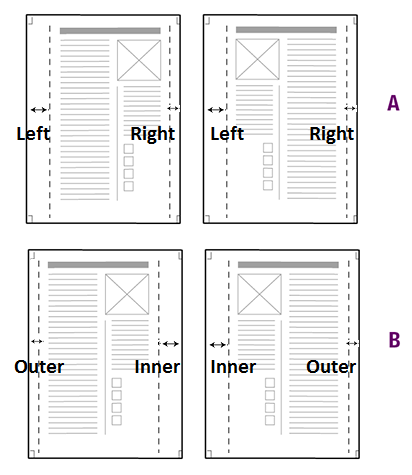
- To make sure that even and odd pages are
mirrored, select Mirror horizontal
margins. This is recommended if the
left and right margin have a different size. Figure 1. Mirror horizontal margins illustrated
A = Mirror horizontal margins is not selected. Margins of odd and even pages are the same; the left margin is larger than the right margin.
B = Mirror horizontal margins is selected. Odd and even pages are mirrored; the outer margin is smaller than the inner margin.
- To only check for text in the page safe type zone, select the Restrict this check to text checkbox.