What it does
Allows the names of color separations to be generated and positioned within a PDF file. The separation names are individually created for each page and show all separations including any spot colors.
You have several options. You can specify:
- How the separation names should be displayed (stacked (i.e. one per line), inline (reflow) or all on top of each other (on same location - useful for color plates); in color or with color patches, rotated, …). You can also determine the font and the font size.
- Where exactly they should be placed on the page (position of the color names relative to a page box).
- Whether or not process colors and separations with 0% tint should be displayed.
- If you have chosen to add color patches, whether or not they should have a border (Add stroke on color patches).
Examples
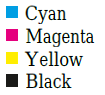
- Example 1: Layout: Stack and Color: Separation names in
black + color patches are selected.
- Example 2: Layout: Overflow and Color: Separation names
in black + color patches are selected. The color patches have a border,
because Add stroke on color patches is enabled.

- Example 3: Layout: Overflow and Color: Separation names
in color are selected.
