What it does
Allows you to select forms based on selected objects. Note that by selecting the forms, the objects themselves are no longer selected.
You can choose whether or not to select nested forms, i.e. forms included inside other forms.
For example, in the example below, the object is part of Form1 and Form2.
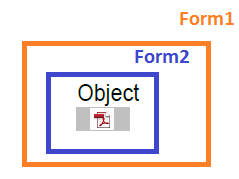
- If Also selected nested forms is cleared, only Form1 (= highest level) will be selected.
- If Also selected nested forms is selected, both forms will be selected.
About forms
Forms are rectangular frames in a PDF, wich contain objects, for example an image or a placed PDF.
For more information about forms, refer to the PitStop Pro Reference Guide on the Enfocus website (See Chapter "Editing forms").
Example
The following example Action List consists of 2 Actions:- The first Action selects all objects inside the art box.
- The second Action selects all forms of which the objects are selected by the first Action, and deselects the objects. Forms inside another form are not selected.
Select objects inside or outside region <!-- select the art box -->
Select form if content is selected <!-- clear the option Also select nested forms -->