Belongs to
- Category: Page
- Type: Selections
What it does
Allows you to select a particular page, a set of pages, or a page range, for example the first or last page of a PDF, all odd pages, pages from 1 to 5, ...
You can also make a selection based on the number of pages in the PDF, for example: Select if number of pages is not a multiple of 10.
New options added in 13 update 1
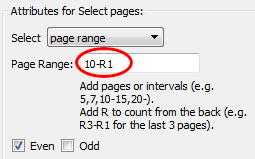
- Rn notation allowed in page range selection. If you want to add pages
starting from the end of the PDF, you can use this notation in the
Page range text box. R1 refers to the last page
(= 1 page from the end), R2 refers to the last but one (= 2 pages from the
end), ...
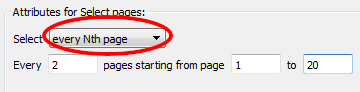
- Extra option to select every Nth page, e.g. every second page in the
PDF in the first 20 pages of the PDF.
Example
To select every page but the first page of a PDF, and then add a copied graphic to
that page, proceed as
follows:
Select all pages <!-- Choose: Select all pages, Even and Odd -->
Select first page <!-- Choose: Select first page, Even and Odd -->
NOT
AND
Add copied graphics <!-- See Add copied graphics -->