Belongs to
- Category: Position/Size; Page
- Type: Changes
What it does
Scales all page boxes (and optionally all page content as well) until the specified page box fits the target size.
The target size should be specified by defining the target width and height either as a value, a percentage of the original value or proportionally relative to the other dimension.
Note that for both the page content and the page boxes you can separately decide whether or not to scale proportionally to match the target page size.
Remark
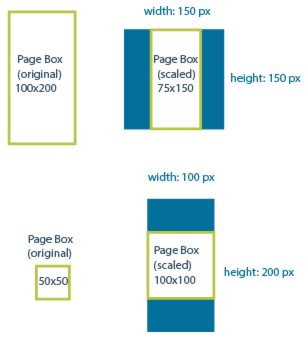
In case of proportional scaling (=default, Allow non-proportional scaling checkbox NOT selected), it may happen that the requested target width and height cannot be achieved without changing the aspect ratio; in that case, the target size serves as a frame in which the resized page box should fit.
For example, if the original page box is a rectangle and the requested width and
height result in a square, the page box will be scaled to fit in the square (and
vice versa). See the image below; the blue object represents the requested target
dimensions.