Belongs to
- Category: Line Art
- Type: Changes
- Since version: 2018
What it does
Grows or shrinks a path by the value defined in the attributes of this Action. This way you can make larger or smaller versions of an object.
Attributes are:
- Offset: Determines how much the path will grow or shrink; this value denotes the distance between the original and the new path. Use negative values to make the path smaller, positive values to make it larger.
- Join: Determines the path's angles. Choices are:
- miter (pointed corner) - in that case you can also determine a miter limit, to make the corners sharper (high value) or less sharp (low value)
- round (rounded corner)
- bevel (flat corner).
- Create copy: Makes sure the original path is kept, in addition to the offset path.
This Action also works on clipping paths and curved paths.
Open paths are automatically closed before growing or shrinking.
Examples
Original object
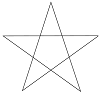
| Chosen options | Result |
|---|---|
| Offset: 5 mm Join: Miter Create copy |
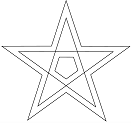
|
| Offset: 5 mm Join: Round Create copy |
 |
| Offset: 5 mm Join: Bevel Create copy |
 |
| Offset: 5 mm Join: Bevel No copy |
 |