Belongs to
- Category: Operators
- Type: Selections
- Since version: 13 update 2
What it does
Allows you to change the order of the selections in the stack.You must set:
- The number of selections to be taken into account, for example "3" if you want to change the order of the 3 last selections preceding the ROLL operator.
- The distance, i.e. the number of positions to move the items in the stack. If distance is set to "1", all selections in the stack move up one position. The selection on top moves down to the bottom of the stack.
Just like the other operators, ROLL must be placed after the selections in the Action
List. The affected selections will be highlighted with a green indicator. Refer to Using operators in Action Lists.
For advanced use only
This Action may be used in advanced and complex Action Lists by users who are familiar with the ROLL operator in PostScript (which has the same functionality).
Example
Suppose you have a document with text, line art and images.
The following Action List results in a stack with the text segments at the bottom and images at the top.
Select text segments
Select line art
Select images
With Roll added (number of selection set to 3 and distance to 1), images will move to the bottom of the stack, line art to the top and images will be inbetween.
Select text segments
Select line art
Select images
Roll                  <!--  Selection set to 3, distance is 1 -->
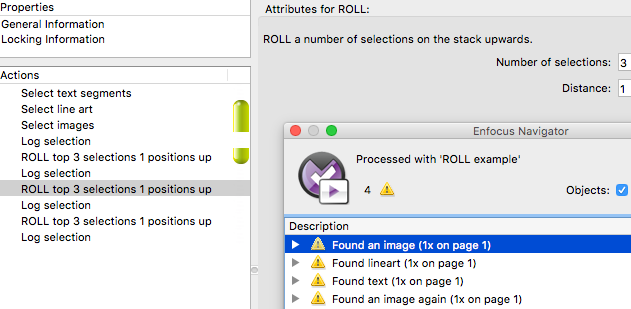
Tip: You can test this by adding Log selections to your Action List and checking the
result in the Enfocus Navigator as shown in the screenshot below.