The attributes you can set depend on the selected Action. Some Actions do not require any attributes; for others you should enter the preferred values, for example a length or a version number, pick a color, select an option from a list, select a checkbox, ... Setting the attributes is in most cases quite obvious.
- How to use variables instead of fixed values.
- How to use regular expressions
- How to log "check" Actions
- How to use the Use page rotation (and scaling factor) checkbox (which is available in a number of Actions)
-
To use variables instead of fixed values:
- Click the Actions link and select Enable Variable Names.
-
Click
 .
.
- Select the variable you want to use.
- Repeat steps b-c for each variable you want to use.
- Click OK.
-
To use regular expressions instead of fixed strings:
- Enable the Use regular expressions checkbox.
-
Create rules using regular expressions. The most commonly used symbols
can be used.
Regular expressions provide a way to find patterns within a text. This is useful in many contexts, for example to check whether a piece of text meets certain criteria, or to find and/or replace strings with a particular pattern. In PitStop Pro, regular expressions are used to configure the attributes of certain Actions (but only available in combination with equal/not equal operators). For an overview of the Actions concerned, refer to the Action manual on the Enfocus website.
PitStop supports Boost Regular Expressions. For more information, refer to http://www.boost.org/doc/libs/1_47_0/libs/regex/doc/html/boost_regex/synt ax/perl_syntax.html.
Examples:
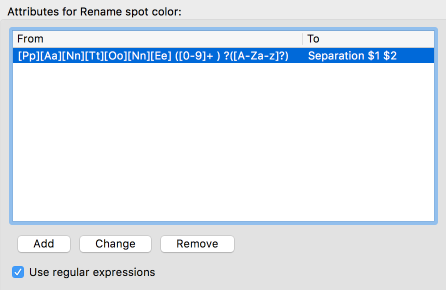
Rename spot color is an Action that allows you to change the name of spot colors in a document.- To rename variants of the same color, e.g. to rename “Varnish0”, “Varnish1”, “Varnish23” (i.e. "Varnish" followed by one or more digits) to “Varnish” (without any digits), you could create a rule that renames "Varnish([0-9])+" to "Varnish".
- To replace "Pantone" (regardless of the case) with "Separation" in
all spot color names used in your document, create the following
rule:
-
In case of Actions of the type "Check", you should determine if and how the
result of the Action should be logged (in the Enfocus Navigator and in the
Report).
- Don't Log: Nothing will be logged.
- Log as warning: If the check is positive, it will
be logged as a warning (
 ). This allows you distinguish between severe and
less severe issues.
). This allows you distinguish between severe and
less severe issues. - Log as error and allow Sign-Off (
 ): If the check is positive, it will be logged as an
error that can be "signed-off", i.e. can be "approved" or evaluated as a
minor error which doesn't fail PDF certification. This is only relevant if
you're running Actions in the context of Certified PDF.
): If the check is positive, it will be logged as an
error that can be "signed-off", i.e. can be "approved" or evaluated as a
minor error which doesn't fail PDF certification. This is only relevant if
you're running Actions in the context of Certified PDF. - Log as error(
 ): If the check is positive, it will be logged as an error. If you're
running Actions in the context of Certified PDF, this kind of problems will
prevent the file from being certified OK. The problem must be fixed, before
the file can be certified.
): If the check is positive, it will be logged as an error. If you're
running Actions in the context of Certified PDF, this kind of problems will
prevent the file from being certified OK. The problem must be fixed, before
the file can be certified.
-
If the Action you're configuring has the Use page
rotation or the Use page rotation and scaling
factor checkbox:
- To take into account page rotation and/or scaling factor, select this checkbox. The Action will be applied to the actual position of the page content.
- To ignore page rotation and/or scaling factor, clear this checkbox. The Action will be applied to the original position of the page content (i.e. BEFORE applying page rotation and/or scaling factor).