This is an overview of the tags that can be used in the
AnnotatedReportSettings section in the config file (.prefs) of an
annotated report template.
Note:
- This section is mandatory if you're configuring an annotated report
template.
- All tags in this section are optional; if you don't need them, you don't have to
specify them. If not specified, the default value applies.
| Tag |
Description and values |
| BookmarksView |
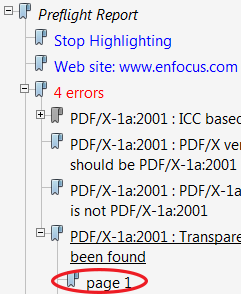
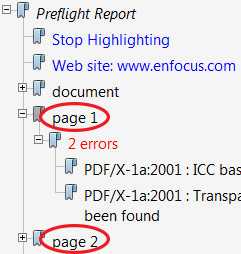
Specifies how bookmarks are displayed. Values:
- ReportItemsView = sorted per item - fix, error, warning
(default)
- PagesView = sorted per page
|
| TransparencyColor |
Color of the overlay in the annotated report, for example "0 10 0" (default). Note:
- You can also use CMYK or RGB values, see Colors and units in the topic The config file (.prefs) of an annotated report.
- The overlay is used to imitate the effect you have in the Enfocus Navigator
when selecting the Highlight checkbox. It allows you to easily see the items
or objects the fixes, warnings, and errors apply to.
|
| ViewingOnly |
Specifies whether or not the annotated report is created for viewing only.
Values:
|
| MustConvertToRGB |
Specifies whether colors should be converted to RGB (only applicable if
ViewingOnly is set to true!). Values:
Conversion to RGB is useful if you want to reduce the file size or if the
report is meant for on-screen viewing (rather than for print).
|
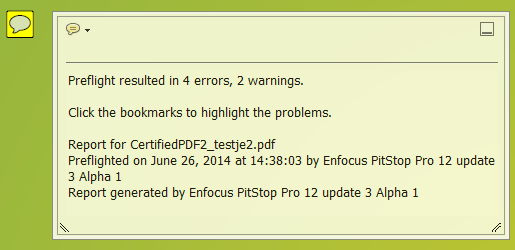
Tags defining the summary annotation:
| Tag |
Description and values |
| AddSummaryAnnotation |
Specifies whether a summary annotation should be added. A summary annotation gives an
overview of the reported fixes, warnings, and errors. Values:
|
| InitiallyOpenSummaryAnnotation |
Specifies whether the pop-up annotation of the summary annotation should be displayed
when opening the report. Values:
|
| SummaryAnnotationColor |
Color of the summary annotation; must be expressed in RGB values, for example
"100 100 0" (default). |
| SummaryAnnotationIconPathName |
An absolute or relative path to a PDF file that contains an image that should
be used as icon for the summary annotation. If not specified, the summary annotation
will have the default comments appearance. |
| SummaryAnnotationIconPageIndex |
Refers to the page in the PDF that contains the icon to be used for the summary
annotation. For example: "1", if the icon is on page 1. |
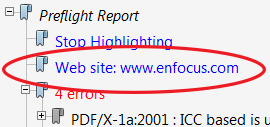
Tags defining a bookmark with a URL:
| Tag |
Description and values |
| MustAddURI |
Specifies whether a bookmark with a URL should be added. Values:
|
| URIDescription |
Text displayed for the URL bookmark. Default value: Web site:
www.enfocus.com
|
| URI |
The URL that should be opened when a user clicks the URL bookmark. Default
value: http://www.enfocus.com
|
Page scaling tags:
| Tag |
Description and values |
| MustScaleLargePages |
Specifies whether a report page should be scaled if the page is larger than the sizes
specified by "MaximumPageWidth" and "MaximumPageHeight" (see below). Pages are scaled
first, before resampling the images. Page scaling and image resampling reduces the
file size of a report. Values:
|
| MaximumPageWidth |
Page width specified in points. The default value is the width of an A4 document
= 595.2756 (points).
Note: Only applies if MustScaleLargePage is set to true; in that case, all pages
of which the page width is larger than the specified value will be
scaled.
|
| MaximumPageHeight |
Page height specified in points. The default value is the height of an A4
document = 841.8898 (points). Note: Only applies if MustScaleLargePage is set to
true; in that case, all pages of which the page height is larger than the
specified value will be scaled.
|
Image resampling tags:
| Tag |
Description and values |
| MustResample |
Specifies whether images should be resampled (only applicable if ViewingOnly is set to
true!). Values:
|
| ResampleMethod |
The resample method that will be used to resample the images in the document. Values:
- AverageDownsampling (default)
- Subsampling
- BicubicDownsampling
- BilinearDownsampling
- BSplineBicubicDownsampling
- BlockAverageDownsampling.
|
| NewDPI |
The resolution that will be used to resample, for example "150"
(default). |
| ThresholdEnabled |
Specifies whether a threshold should be set for resampling. Values:
|
Tags related to security:
| Tag |
Description and values |
| ChangeSecurity |
Specifies whether or not the security setting of the report should be changed.
Values:
- true = The security setting of the report is set to the
value specified in the Security tag (below), using the password specified in
ReportPassword (below).
- false (default) = The report will have the security
settings of the original document.
|
| Security |
If ChangeSecurity (see higher) is set to true, this setting specifies the
security to set on the report document. Values:
- LowResolutionPrintingAllowed (default)
- EditingNotAllowed
|
| ReportPassword |
If ChangeSecurity (see higher) is set to true, this setting should contain the
password required to change the security setting of the report. Note: If no password
is specified, ChangeSecurity is ignored, i.e. the security setting will not be
changed.
Values:
- password
- "" = no password (default)
|
Tags related to Certified PDF:
| Tag |
Description and values |
| CertifiedReportSave |
Specifies if a certified full save should be performed to reduce the file size of the
report.Note: Applies to editable reports only (ViewingOnly = false) for which
the security setting will not be changed (ChangeSecurity =
false).
Values:
- CertifiedIncrementalSave (default) = An incremental save
means that all changes are logged per session and saved in an edit log file. You
can revert to a previous version of the document if required.
- CertifiedFullSave = A certified full save results in a
Certified PDF document with history information about previous editing sessions.
It is however not possible anymore to save snapshots of these settings or to
revert to a previous state of the Certified PDF.
|
| PreventArchiveCertifiedWFHistory |
Specifies whether or not the history for certified documents should be removed; if this
is the case, it is not possible anymore to revert to the certified document (i.e. the
original document before annotations have been added, as annotated reports cannot be
certified).Note: Applies to editable reports only (ViewingOnly = false).
Values:
- true = When restoring the document, no certified
document will be created.
- false (default) = When restoring the document, a
certified document will be created based on the (preserved)
history.
|