PitStopReportPreflightChapter

This is an overview of the tags that can be used in the PitStopReportPreflightChapter section in the config file (.prefs) of a regular report template. This section is used to configure the content of the ‘Preflight Report’ chapter.
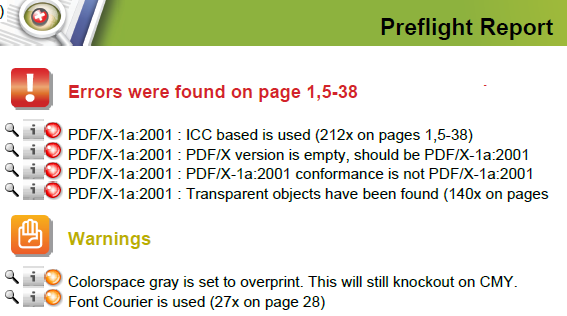


Tag Description and values
Columns X-coordinates of the columns in the Preflight Report chapter. For each column, you should provide 2 values (left and right side). This chapter has 4 columns (defined by 8 values). Example: "42.52 51 56 65 70 80 85 552.75"
Note: Don't forget the unit is points!
IncludeThisChapter Determines whether or not this chapter is included in the preflight report. Values:
  • true = This chapter is included in the preflight report if it should be included according to the Action List or Preflight Profile that produces the report.
  • false = This chapter is never included in the preflight report (regardless of the Action List or Preflight Profile that produces the report).
IncludeWhenEmpty Determines whether or not this chapter is included in the preflight report when there is no information available. Values:
  • true = This chapter is included even when it is empty.
  • false = This chapter is excluded from the preflight report when there is not information available. This will decrease the file size and speed up the preflight report creation.
UseSignOffCategory Decides whether or not items that are signed off (i.e. evaluated as "not blocking") are included in the report.

Note that this section is only added to the report after errors have been signed off (using the Enfocus Navigator).

Values:
  • true = Items that can be signed off are included.
  • false = Items that can be signed off by the user are not included.

More information about signing off on errors can be found in the PitStop Pro Reference Guide on the Enfocus website.

Tags defining the maximum number of warnings, errors, ... that will be listed in the report:

Tag Description and values
MaxNumWarningItems Specifies the maximum number of warnings listed in the Preflight Report chapter. If more warnings are detected, they are not listed, but a message appears: "List is incomplete". Values:
  • -1 = List all warnings
  • <number> = List only <number> warnings (even if there are more)
MaxNumErrorItems Specifies the maximum number of errors listed in the Preflight Report chapter. If more errors are detected, they are not listed, but a message appears: "List is incomplete". Values:
  • -1 = List all errors
  • <number> = List only <number> errors (even if there are more)
MaxNumFailureItems Specifies the maximum number of failures listed in the Preflight Report chapter. If more failures are detected, they are not listed, but a message appears: "List is incomplete". Values:
  • -1 = List all failures
  • <number> = List only <number> failures (even if there are more)
MaxNumFatalFailureItems Specifies the maximum number of critical failures listed in the Preflight Report chapter. If more critical failures are detected, they are not listed, but a message appears: "List is incomplete". Values:
  • -1 = List all critical failures
  • <number> = List only <number> critical failures (even if there are more)
MaxNumFixItems Specifies the maximum number of fixes listed in the Preflight Report chapter. If more fixes are detected, they are not listed, but a message appears: "List is incomplete". Values:
  • -1 = List all fixes
  • <number> = List only <number> fixes (even if there are more)
MaxNumInfoChapterItems Specifies the maximum number of items listed in the information chapters (e.g. the maximum number of fonts in the Font information chapter). If more info items are detected, they are not listed, but a message appears: "List is incomplete". Values:
  • -1 = List all info items
  • <number> = List only <number> info items (even if there are more)