Belongs to
- Category: Page
What it does
Sets the size of the specified page box to fit the size of the visible page content, possibly with an extra margin.
As a consequence, invisible content (for example objects that are clipped away) is not taken into account, hence can be (partly) outside the page box.
How to proceed
- Specify the page box of which you want to change the size.
- If you want to set an extra margin, select the with offsets of
checkbox and define the offsets. Note: The option Mirror horizontal margins determines if you have to specify values for the left and right or the outer and inner margin (see screenshot below).
- To make sure that even and odd pages are mirrored, select Mirror horizontal margins. This is recommended, if the left and right margin have a different size.
Figure 1. Mirror horizontal margins illustrated
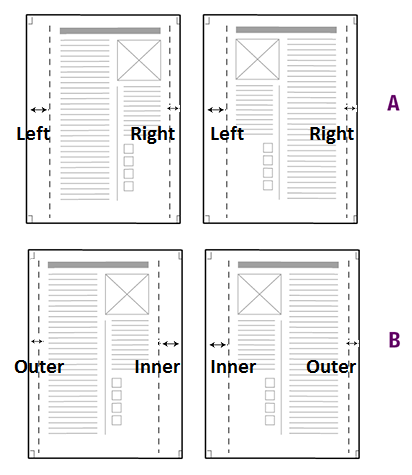
A = Mirror horizontal margins is not selected. Margins of odd and even pages are the same; the left margin is larger than the right margin.
B = Mirror horizontal margins is selected. Odd and even pages are mirrored; the outer margin is smaller than the inner margin.