Belongs to
- Category: Page
What it does
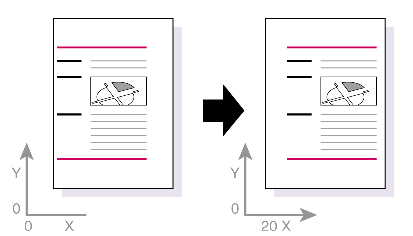
Changes the physical position of the page content of odd and even pages throughout the entire PDF document by entering new values for the horizontal X and vertical Y axes, or by aligning the page content with a page box edge, corner, or center.
Figure 1. Moving the page content along the horizontal
X and vertical Y axes.
Example
You can use this Global Change to fit a PDF in US letter paper size onto a regular A4 without altering the actual page setup of your document.
How to proceed
- To move he content along the X axis, select the Move horizontally
checkbox and indicate how the content should be moved:
- Move: Move the content to the right by a specified distance, for
example 5 cm.You must specify the distance and whether or not the specified distance should be mirrored on even pages.Note: The unit is defined by a setting in the PitStop Pro Preferences, in the Units & Guides category.
- If Mirror on even page is cleared, the content of both even and odd pages will be moved to the right.
- If Mirror on even page is selected, the content of odd pages will be moved to the right and the content of even pages will be moved to the left.
- Center: Move the content to the right or the left, to align it with the center of the page box of your choice.
-
Align: Align the content with the left or right side of the page box of of your choice. You can add a margin and specify how the content of even pages should be moved:
- If Mirror on even page is cleared, the content of both even and odd pages will be moved in the same direction (e.g. aligned with the left side of the trim box).
- If Mirror on even page is selected, the content of even pages will be moved in the opposite direction (e.g. if the odd pages are aligned with the left side of the trim box, even pages will be aligned with the right side of the trim box).
- Move: Move the content to the right by a specified distance, for
example 5 cm.
- To move the content along the Y axis, select the Move vertically
checkbox and indicate how the content should be moved. The options are similar to the ones
under Move horizontally:
- Move: Move the content up by a fixed distance, for example 5 cm.Note: The unit is defined by a setting in the PitStop Pro Preferences, in the Units & Guides category.
- Center: Move the content up or down, to align it with the center of the page box of your choice.
- Align: Align the content with the top or bottom of the page box of of your choice. You can add a margin as required.
- Move: Move the content up by a fixed distance, for example 5 cm.