Belongs to
- Category: Page
What it does
Detects print marks and sets the trim and bleed boxes to those marks.
How to proceed
- Specify the color of the trim marks by choosing one or more of the following options:
- 400% CMYK
- Separation All (registration)
- 100% black
- A specific color
- If desired, specify how much the marks are allowed to deviate from the expected
position.
The unit is the unit set in the PitStop Pro Preferences (Units & Guides category), for example: cm or pt
Example
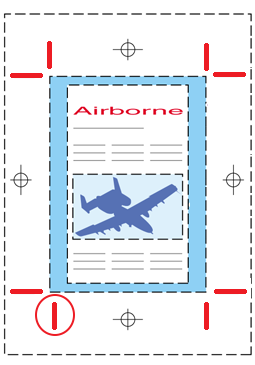
In the image below, the red marks are detected as trim marks and used to set the trim box
(blue box). The position of the vertical marks in the top and bottom left corner is
not as expected (they are not exactly on one vertical line), but the deviation (=
difference between the position of both marks) is less than the specified
threshold.