Belongs to
- Category: Page
What it does
Splits pages in half. A page (or pages) can be split horizontally, vertically or depending on the orientation defined for the page (example: portrait or landscape). You can also select the page box you want to base this split on.
Example
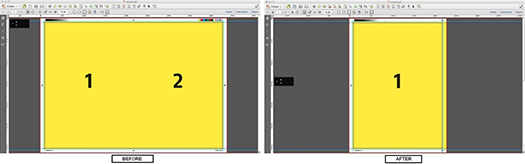
The following screenshot shows a page before it is split and after it is vertically split.
How to proceed
- From the Split pages in half drop-down menu, select the appropriate
option:
- To split all the pages horizontally in half, select all pages horizontally.
-
To split all the pages vertically in half, select all pages vertically.
-
To split only portrait pages in half, select only portrait pages.
-
To split only landscape pages in half, select only landscape pages.
-
To split the pages with the least used orientation, choose automatic.
First, the PDF is analyzed for portrait and landscape pages and then the pages are split. Landscape pages will be split vertically and portrait pages will be split horizontally. All other pages will be untouched.
- From the second drop-down menu, select the page box to base the split on:
- media box
- trim box
- detected Trim Marks
- To clear the area outside the trim box (after the pages have been split), select Remove all objects that lie completely outside the trim box.
- To append any new printer marks to the split pages, select Add new printer marks.