Overview
The illustration below shows the various types of page boxes.
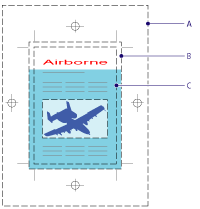
A - Media box
B - Bleed box
C - Trim box
Media box
The media box is the largest page box. The media box corresponds to the page size (e.g. A4+, A5+, US Letter etc.) that you selected when you printed your document to a PostScript or PDF file. In other words, the media box determines the physical size of the media on which the PDF document is displayed or printed.
Bleed box
If you use bleed in your document, the PDF document should also have a bleed box. Bleed is the amount of color (or any other artwork) that extends beyond the edge of a page. You can use bleed to make sure that, when the document is printed, the ink will be printed to the edge of the page.
Trim box
The trim box indicates the final size of a document after printing and trimming.
Crop box
The crop box is the “page” size at which your PDF document is displayed in Adobe Acrobat. In normal view, only the contents of the crop box are displayed in Adobe Acrobat.
If the crop box is equal to the trim box, the finished page is what you will see in Adobe Acrobat. If the crop box is equal to the media box, you will see the whole page including registration and printer marks.
Art box
The last type of page box is the art box. It defines an area of the page (e.g. an image) that can be positioned in a page layout application.
The art box must always be smaller than the bleed box. However, the art and trim boxes may have the same dimensions.