Why this message?
PitStop checked if the document contains white text that is not set to knockout the underlying separations.
If your document contains white text, you have to make sure that the colors behind the text
are not printed. If these underlying colors were to be printed, even the slightest
misregistration of the color plates might result in deformed white text characters. 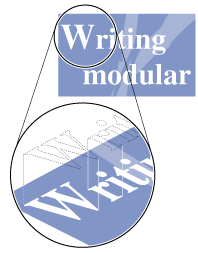
This is
called knockout printing: the white text should cut out (“knock out”)
the colors on any underlying separations.
Solutions
You can set all white text to knock out the underlying colors
using:
- A Preflight Profile. In the Text category, enable the White text check and enable the corresponding fix: Knock out white text.
- A pre-defined Action List: Knockout White Text. You can find this Action List in the Standard database (Prepress category).
- A Global Change: Change Overprint.
- The Enfocus Navigator.