To change the properties of a flow element
-
Select the flow element of which you want to change the properties.
Note: If you select multiple (similar) flow elements at the same time, you can change the common properties.The properties of the selected flow element(s) are displayed in the Properties pane.
- Click the property you want to change. Depending on the selected property, a text box, a button, or a drop-down menu appears.
-
Make the required changes:
Your changes are applied immediately.
If ... appears Do the following: A text box Type the text in the displayed text field. A drop-down menu Select the appropriate option. 
1. In the the property editor dialog that pops up, update the field(s) as required.
2. Click OK.

1. From the pop-up list, select one of the options.
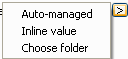
Depending on the selected option, an inline editor or a dialog appears.
2. Configure the desired values.