This topic explains how change the sorting method from sorting based on file type to sorting based on variables.
In this example, only files with a trim box size of 144 x 252 pixels should be moved to the PDFs folder; all other files should be moved to All other files.
- Duplicate Tutorial 1 Flow and name it Tutorial 1C flow.
-
Set the connection between Sort for PDF and PDFs
on hold.
- Select the connection between Sort for PDF and PDFs.
- Right-click and select Hold. Alternatively, you can set the Connection property Hold jobs to Yes. This stops the flow and holds the input in the Sort for PDF folder. This will allow Switch to use this PDF as an example when defining a condition with variables.
- Save and activate the flow.
- Add a PDF file (e.g. Job_Part1.pdf) to the flow.
-
Once the file has been moved to Sort for PDF, click
 to stop the
flow.
to stop the
flow.
-
Define the sorting parameters.
- Select the connection between Sort for PDF and PDFs.
- In the Properties pane, select the Include these jobs field.
-
Click
 and select Define condition with variables from
the pop-up menu.
and select Define condition with variables from
the pop-up menu.
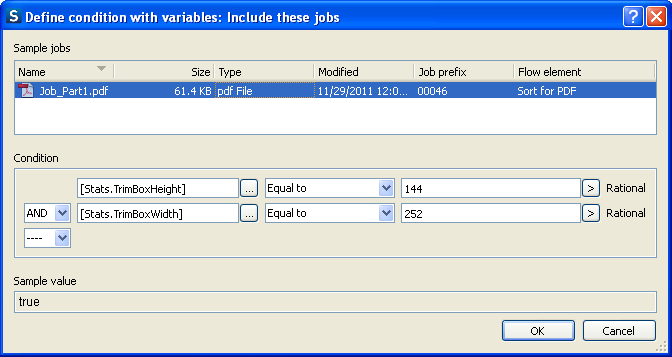
In the Define condition with variables dialog the test file is listed (as shown above). -
Under Condition, next to the first field, click
 to edit the variable
parameters.
The Define text with variables dialog
lists all the variables available for selection.
to edit the variable
parameters.
The Define text with variables dialog
lists all the variables available for selection.
-
Select the file at the top of the Define text with
variables dialog and set the variable condition as
follows:
- From the Groups column, select Stats.
- In the Variables column, select
TrimBoxHeight.
Note that the values in the column to the right change as you make your selection.The value of the selected variable in the test file (in this example: the height of the trim box in Job_Part1.pdf, i.e. 144 (pixels)) is displayed in the bottom part of the 3rd column.
- Click Insert variable.
The Text with variables field displays the variable that will be used for sorting the input files, in this example: [Stats.TrimBoxHeight].
- Click OK.
- In the Define condition with variables dialog, select Equal to and type 144. You have defined the first condition.
-
To add a second condition, click
 and select AND.
- Repeat the previous steps, to define an additional condition, i.e. set the required trim box width to 252.
- Click OK to complete the setup.
-
Check your results.
- Select the connection between Sort for PDF and PDFs.
- Right-click and select Release. Alternatively, you can set the Connection property Hold jobs to No.
- Save and activate the flow.
- Drag and drop Job_1.pdf and Job_2.pdf into the Input 1 folder within the flow. Job_1.pdf is moved to the PDFs folder and Job_2.pdf is moved to the All other files folder.