This topic explains how to group and ungroup a job folder.
- Create a new flow (Tutorial 2 Flow) with an input folder (called Input).
- From the Flow elements pane, add the Ungroup job element to the right of the Input folder. No settings are required. The job folders that flow through this element will be ungrouped into their individual files. Switch will automatically remember the structure and add it to the files as private data, so that they can be reassembled later if needed.
-
Add the following flow elements:
- 4 job folders (Sort, PDF, Other files, Collect)
- 1 Assemble Job flow element
-
Define settings to reassemble the job, This will tell the flow element to look
for complete jobs that were "Ungrouped" before reconstructing them.
- Select the Assemble Job flow element.
- In the Properties pane, select the Scheme property and set its value to Ungrouped job.
- Change the Subfolder levels property to 2, so that it reassembles the job folder with up to two subfolder levels. If the original job folder contained less levels, the extra level will be ignored.
- Add a new folder called Regroup to the right of the Assemble job flow element.
-
Connect all the elements (see screenshot).
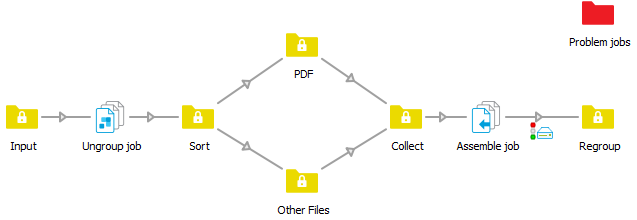
- Change the connection properties to sort for PDFs (see exercise 1).
-
Check your results.
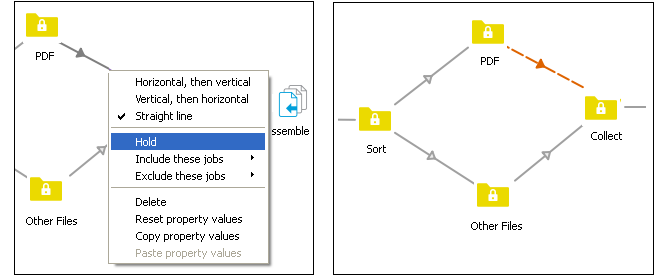
Before this flow is activated, put one of the connections on hold, so that you
can see how the job is disassembled and reassembled. The connection changes to a
dashed line (see below).
- Save and activate the flow.
-
Drag and drop the entire job folder, Tutorial Job Folder into
the Tutorial 2 input folder. Note that the job folder is constructed as
follows:
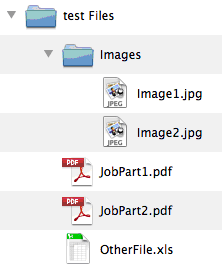
When the job processes, the number of files in the PDF folder increments to 2 and the Collect folder increments to 3.
- Click each folder and review the Jobs pane to see how the job folder has been ungrouped.
- Right-click the connection between the PDF folder and the Collect folder and select Release. This will allow the PDF files to move forward in the flow to be reassembled. Note that the job is not reassembled until all the files for that job are available to reassemble.
- Now review the Regroup folder. The original folder structure has been restored.