This topic explains how to pass hierarchy information from one flow to another. This is done by linking the output folder of one flow to the input folder of the second flow, and by adding an Archive hierarchy element to the end of the flow.
- Duplicate "Tutorial 3A Flow" and rename it Tutorial 3B Flow.
- Duplicate "Tutorial 2 Flow" and rename it Tutorial 3C Flow.
-
From Tutorial 3B Flow, copy Archive hierarchy and paste it into
the new Tutorial 3C Flow. .
- Select "Archive hierarchy".
- Right-click and select Copy. All properties will be retained.
- Switch to Tutorial 3C Flow, right-click in the canvas area and select Paste.
- Place the Archive hierarchy element near the end of the flow.
- Switch back to Tutorial 3B Flow and delete the Archive hierarchy flow element.
-
Link the last folder in the flow (Folder 4) to an external folder called
Workflow Input 3C.
Your Tutorial 3B Flow should now look like this:
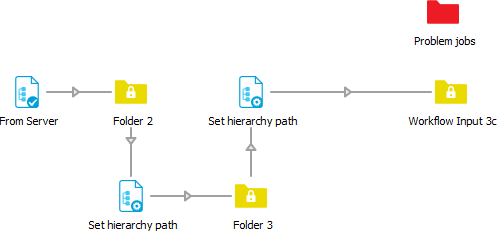
- In the Properties pane of Workflow Input 3C, set Strip unique name to No. This avoids that Switch removes private data (such as the hierarchy information) from the files.
- Switch to Tutorial 3C flow for editing.
-
Link the input folder of Tutorial 3C flow to the output folder of
Tutorial 3B flow.
- Select the Input folder.
- In the Properties pane, click Path.
-
Click
 and select Choose
folder.
and select Choose
folder.
- Select the Workflow Input 3c folder on your desktop. Now when the Tutorial 3B flow places a file in this folder, the Tutorial 3C flow will detect it for processing.
-
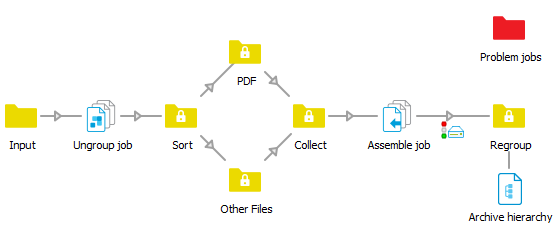
Make a connection between the Regroup folder and the Archive hierarchy element
(copied from the Tutorial 3C flow).
This makes sure that processed jobs are placed back in the correct folder.
-
Check the result.
- Save and activate both flows.
- Place the Tutorial Job Folder folder in any of the Client Incoming folders within the tutorial hierarchy. If successful, the processed Tutorial Job Folder folder is placed in a new subfolder called Completed. This should take about 20-30 seconds in total to process.