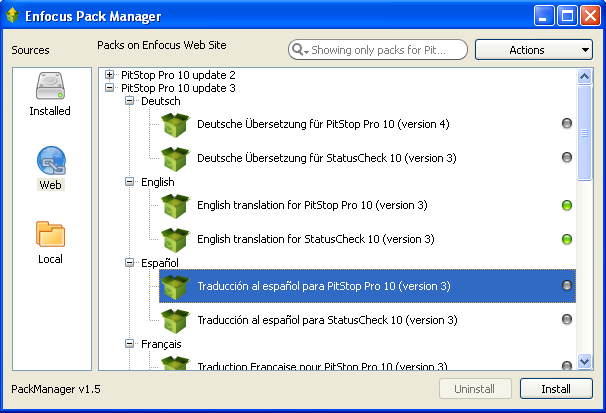
The PitStop Pro help system can be displayed in a language other than English by installing the appropriate language pack and selecting the desired language in the Enfocus PitStop Pro Preferences. Installing languages is done via the Enfocus Pack Manager dialog box.
Installed tab
This tab lists all the language packs which are already installed. You can,
- Search for a pack using the search field.
- Use the Actions button to install, uninstall, download and refresh the available language packs. Apply various filter options using the Show menu.
- Uninstall a pack using the Uninstall button.
- View a list of configurators installed on the computer if Enfocus Switch is also installed on it.
Web tab
This tab lists all the language packs available for download from the Enfocus website. You
can,
- Search for a language pack using the search field.
- Use the Actions button to install, uninstall, download and refresh the available language packs. Apply various filter options using the Show menu.
- Install a pack using the Install button.
- Uninstall a pack using the Uninstall button.
- View a list of configurators (both installed and not installed) if Enfocus Switch is also installed on it.
Local tab
This tab provides a list of locally stored packs (for example: packs that were downloaded but
not yet installed, installed packs appear in the Installed tab). You
can,
- Search for a pack using the search field.
- Use the Actions button to install, uninstall, download and refresh the available language packs. Apply various filter options using the Show menu.
- Browse to the local folder where the language packs are stored using the Browse for folder button.
- Install a pack using the Install button.
- Uninstall a pack using the Uninstall button.
Note: The Enfocus Pack Manager is common across all Enfocus products. It
helps you in selecting and installing the language packs and the configurators (in case you have
Enfocus Switch installed) of your choice.