How exactly does preflighting work in PitStop Pro ? The typical stages in a preflight check are the following:
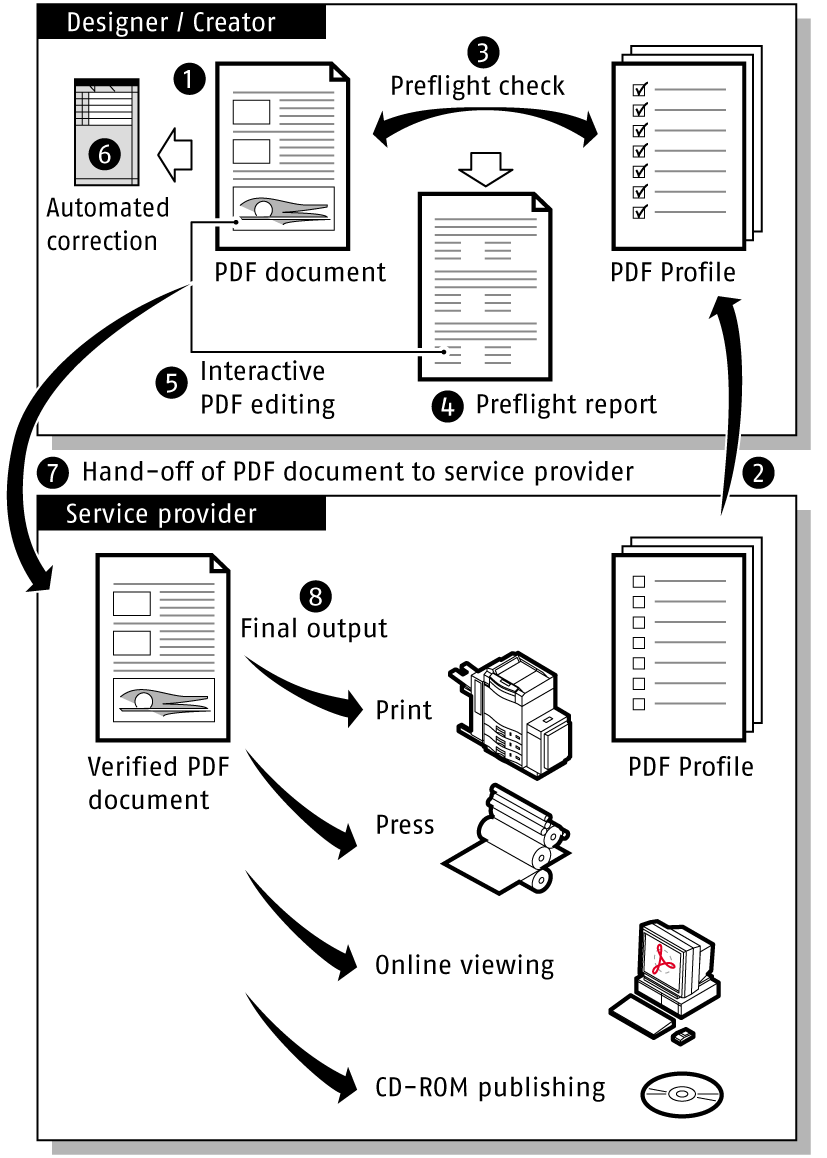
- Open the PDF document which has to be checked.
- Create a new Preflight Profile or select an existing one.
- Have PitStop Pro check your PDF document against the Preflight Profile and automatically fix a number of detected problems.
- PitStop Pro generates a preflight report.
- If necessary, interactively resolve detected problems which were not fixed automatically in the PDF document.
- If necessary, use Action Lists to perform a number of (advanced) automated corrections in the PDF document.
-
Hand off the verified PDF document
to your service provider.
The service provider receives an output-ready PDF document and takes it to the final output stage, for example, for print, press or online viewing.