| Channel |
Separation to which the curve will be applied. Example: The red channel of an
RGB image.
|
| Preview |
Enabled: Displays a preview of the changes on the PDF document. Tip: Zoom in to speed up the preview display.
|
 |
Resets the curve. |
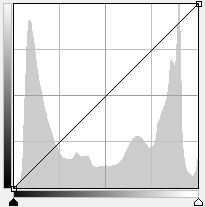 |
You can:
- Click the curve to add control points to it.
- Drag control points to edit the curve.
- Drag control points away from the pane to remove them.
|
| Input - Output |
Adjusts a specified input to a specified output brightness value. The curve
adjusts correspondingly.
|
| Apply |
Applies your changes to the selected images. |