-
Click the Create New Rectangle tool
 or the Create New Ellipse
tool
or the Create New Ellipse
tool .
.
-
Position the pointer on a page of the PDF document
and do one of the following:
- To draw a new rectangle or ellipse, drag diagonally.
- To draw a square or circle, hold down the SHIFT key while dragging.
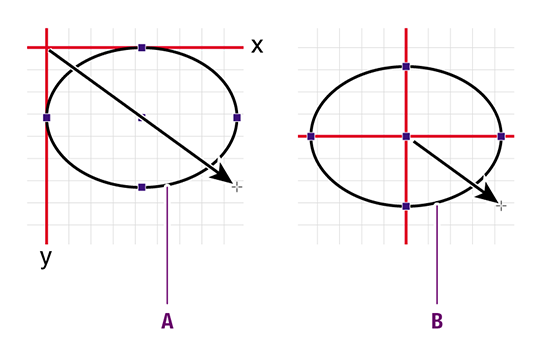
- To draw a rectangle or ellipse, starting from its center and not from its side, hold down the ALT key (Windows) or Option key (Macintosh) while dragging.
-
Drawing from side keeps the sides of the shape in a fixed position along the x and y axis
-
Drawing from center keeps the center point in a fixed position.
- To draw a square or circle, starting from its center, hold down both the SHIFT key and the ALT key (Windows) or Option key (Macintosh) while dragging.