| 1 |
Select text. Location:
Tools pane:
|
 |
| 2 |
Split in characters. Location:
Enfocus
Inspector dialog box:
|
 |
| 3 |
Select characters. Location:
Enfocus Editing
Tools toolbar: 
Location in Acrobat X or
XI:
Tools pane:
|
 |
| 4 |
Apply a gradient fill. Location:
Enfocus
Inspector dialog box:
|
 |
| 5 |
Change the gradient fill with the control bar in the
Enfocus Inspector dialog box: 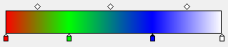
- Add color control points by clicking at the bottom of the
bar.
- Remove color control points by dragging them away from the
control bar, or by selecting them and pressing the Delete
key.
- Change the color by double-clicking color control
points.
- Change the position of color control points and midpoints by
dragging them along the control bar (or by changing the
Location option for a selected
control point).
|
 |


