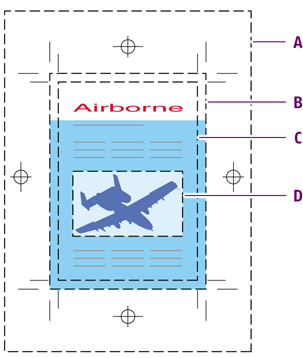
The illustration below shows the various types of page boxes.
-
Media box
-
Bleed box
-
Trim box
-
Art box
| Type | Description |
|---|---|
| Media box | The media box is the largest page box. The media box corresponds to the page size (for example A4, A5, US Letter etc.) that you selected when you printed your document to a PostScript or PDF file. In other words, the media box determines the physical size of the media on which the PDF document is displayed or printed. |
| Bleed box | If you use bleed in your document, the PDF document will also have a bleed box. Bleed is the amount of color (or any other artwork) that extends beyond the edge of a page. You can use bleed to make sure that, when the document is printed and cut to size (“trimmed”), the ink will be printed to the edge of the page. Even when the page is “mistrimmed”, i.e. cut slightly off the trim marks and a bit more to the “outside” of the page, no white edges will appear on the page. |
| Trim box | The trim box indicates the final size of a document after printing and trimming. |
| Art box | The art box is the box drawn around the actual contents of the pages in your documents. This page box is used when importing PDF documents in other applications. |
| Crop box | The crop box is the “page” size at which your PDF document is displayed in Adobe Acrobat. In normal view, only the contents of the crop box are displayed in Adobe Acrobat. |