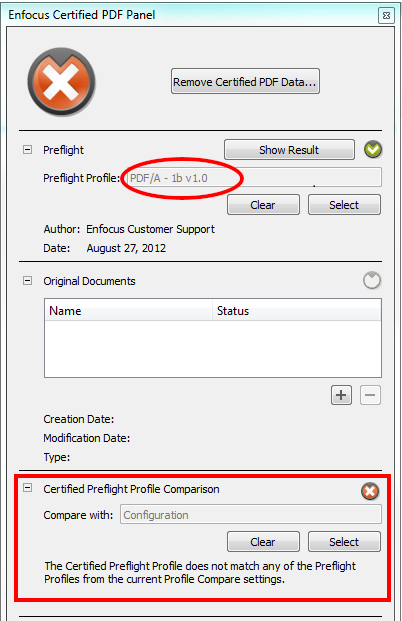
In the Certified Preflight Profile Comparison category in the Certified PDF Panel, you can compare the Preflight Profile that is attached to the PDF to one or more of your own Preflight Profiles (collected in a so-called "configuration"). This allows you to check if the attached Preflight Profile meets your requirements.
The name of the Preflight Profile attached to the PDF is shown in the
Preflight category. In the example below, the PDF has been
preflighted with "PDF/A - 1b v 1.0". The green icon  indicates that the preflight was successful.
The Profiles to compare with (included in a configuration) must be
selected in the Certified Preflight Profile Comparison category.
In the example below, the configuration used is called
"Configuration". When you select the configuration, the files
are compared immediately and the result is displayed underneath
the buttons. In the example below, the result of this comparison
is negative ( ): the
Profiles in the configuration do not equal the Profile attached
to the PDF. As a consequence, the overall Certified PDF status
is NOK ( at
the top of the dialog). For more information about the Certified
PDF Status, refer to The aspects of the Certified PDF Status.
): the
Profiles in the configuration do not equal the Profile attached
to the PDF. As a consequence, the overall Certified PDF status
is NOK ( at
the top of the dialog). For more information about the Certified
PDF Status, refer to The aspects of the Certified PDF Status.