The QuickRun Editor is accessible from within the QuickRuns dialog: when
double-clicking a QuickRun (or selecting Edit from the contex menu), this
dialog appears. It allows you to edit the content of a QuickRun.
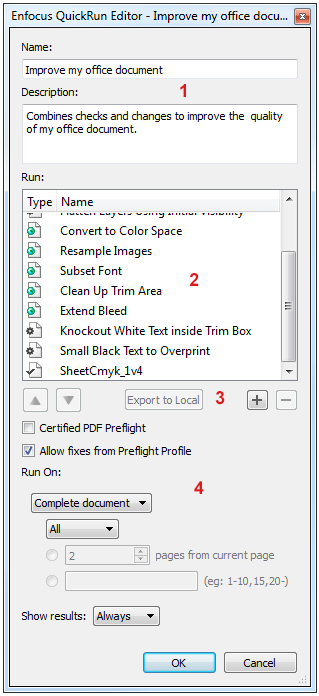
The QuickRun Editor consists of the following screen parts:
| # | Description |
|---|---|
| 1 | The name of the QuickRun and a description of what the QuickRun does. |
| 2 | The Action Lists, Global Changes and the Preflight Profile that will be applied when running the QuickRun. |
| 3 | A number of buttons allowing you to configure the contents of the QuickRun:
|
| 4 | The bottom part of the dialog allows you to set some preflight related options, to define the page range the QuickRun should be applied to, and whether or not the results should be shown. |
 and
and  : Use these buttons to
change the order of execution.
: Use these buttons to
change the order of execution. and
and  : Use these buttons to
add or remove Action Lists, Global Changes and/or a Preflight Profile to the QuickRun.
: Use these buttons to
add or remove Action Lists, Global Changes and/or a Preflight Profile to the QuickRun.