Proceed as follows:
-
Using the Select Objects
tool
 ,
select the text or line art of which you want to check whether it has an ICC
profile.
,
select the text or line art of which you want to check whether it has an ICC
profile.
-
Do one of the following:
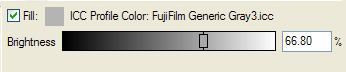
- Select a profile from the list. The text or line art
is tagged with the selected profile and the name of the ICC profile
appears above the color sliders.
- Select (None) to remove the ICC profile from the selected text or line art.
- Select a profile from the list. The text or line art
is tagged with the selected profile and the name of the ICC profile
appears above the color sliders.