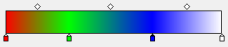
This example applies a gradient fill (in RGB colors) to certain characters and leaves others black.
| Step | Action | Result |
|---|---|---|
| 1 | Select text. Location: Tools pane: PitStop Edit >
|
 |
| 2 | Split in characters. Location: Enfocus Inspector dialog box:
|
 |
| 3 | Select characters. Location: Enfocus Editing
Tools toolbar: Location in Acrobat X or XI: Tools pane: PitStop Edit >
|
 |
| 4 | Apply a gradient fill. Location: Enfocus Inspector dialog box:
|
 |
| 5 | Change the gradient fill with the control bar in the
Enfocus Inspector dialog box:
|
 |