Messages resulting from "Check" or "Change" Actions and shown in the Preflight
Report and the Enfocus Navigator can be customized in several ways. You can for
example:
- Rephrase the default text to make it easier to understand for non-technical people
- Add extra information (e.g. what to do in case of problems)
- Add a link to a web page with more information
To do so, proceed as follows:
-
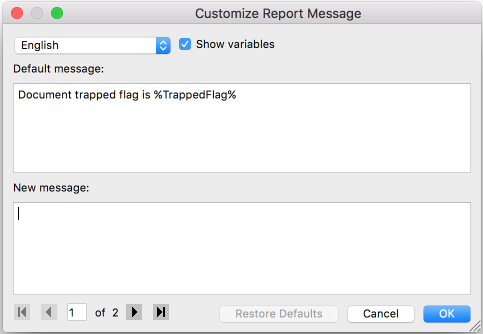
From the menu, select Customize report message.
The Customize Report Message dialog appears.
-
Enter a new message in the second field.
If you don't, the default message will be used.
Tip: We recommend copying the message from the first into the second field (making sure Show variables is selected). That way you're sure the variables are written correctly. If a variable contains a typo, it will not be recognized as such and it will be considered a fixed string.Special cases- Built-in configuration variables refer to the options in
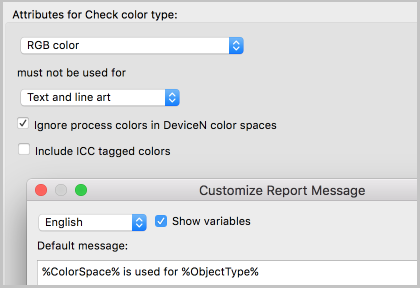
the attributes of the Action. If you clear the Show
variables checkbox, you can see what they refer to.
In the example below, %ColorSpace% refers to the value chosen from
the first list (RGB color), whereas %ObjectType% refers to the value
chosen from the second list.
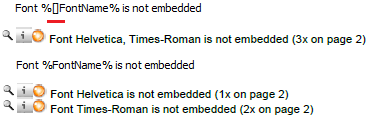
- Square brackets such as "[]" inside a variable indicate
that the variable may be replaced with more than one value,
depending on what's found in the PDF. For example,
"%[]fontName%" means that more than one font name may be
mentioned in the message. If written like this, the font names are
listed, one after the other. If the square brackets are removed,
you'll have a separate message on a separate line for each different
font name. See the example below:
- Square brackets enclosing 3 dots such as "[...]" inside a
variable refer to a range, e.g. %[...]ActualPointSize% means
that the smallest and the largest point size found in the document
will be mentioned in the message, separated by three dots. Values
inbetween will not be mentioned. If you remove the three dots, all
values found in the document will be mentioned (separated by a
comma). Alternatively, you could remove the square brackets,
resulting in one separate message per point size value. See the
examples below:
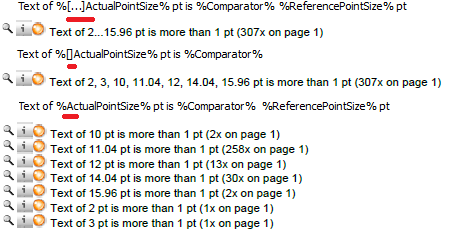 Note: Make sure to use the correct notation; if you omit one dot, or write 4 dots, this will not work!
 - If you want to display a link in a report message, simply type the URL (e.g. http://www.enfocus.com). When users click this URL in the Preflight Report, the corresponding web page will be opened.
- Note that a small number of messages cannot be customized, because they result from Actions that use another mechanism and are generated "on the fly". For these messages, you'll see a warning "This Action has no customizable messages".
- There's one Action with a slightly different user interface: Log Selection. For this Action, no default report message is available. You should enter your custom report message directly in the Attributes section.
- Built-in configuration variables refer to the options in
the attributes of the Action. If you clear the Show
variables checkbox, you can see what they refer to.
In the example below, %ColorSpace% refers to the value chosen from
the first list (RGB color), whereas %ObjectType% refers to the value
chosen from the second list.
If you run the Action on a document, the new message instead of the default message
will be displayed.
Note: If you ever want to return to the default message, in the attributes of the
Action, click .