When you create a QuickRun, you must select the Action Lists, Global Changes and/or a Preflight Profile you want to run on the currently opened document. As you cannot edit or change the content of Action Lists, Global Changes and Preflight Profiles from within a QuickRun, we recommend checking or preparing them first, before creating the QuickRun.
To create a QuickRun
-
Do one of the following:
- To create a new QuickRun based on an existing one, click
 > New > New From/New from File and select the QuickRun you want to start from.
The option New from allows you to select an existing QuickRun from the Standard database; New from file allows you to select a file (*.eqr) from your computer.
- To create a new QuickRun from scratch, click > New > New.
- To create a new QuickRun based on an existing one, click
-
Click
 , and
select the Action List(s), one or more Global Changes, and/or the Preflight
Profile you want to add to your
QuickRun.
, and
select the Action List(s), one or more Global Changes, and/or the Preflight
Profile you want to add to your
QuickRun.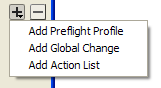
-
Click the Move Up
 or Move Down
 button to set the sequence in which the Action Lists and
Global Changes should be run.
Note: Check the sequence of the Action Lists and Global Changes carefully because running the same Actions in a different order may produce a different outcome. You may want to test this first by running the Actions individually and check which sequence is correct.
button to set the sequence in which the Action Lists and
Global Changes should be run.
Note: Check the sequence of the Action Lists and Global Changes carefully because running the same Actions in a different order may produce a different outcome. You may want to test this first by running the Actions individually and check which sequence is correct.