Restrictions in a Preflight Profile
Restrictions are a way to limit the scope of your Preflight check; instead of applying all checks to the whole document, you can now for each (set of) checks define on what part of the PDF the check(s) should be run - be it a PDF page box, a certain page or pages, a particular area or specific elements of a PDF, or even different layers within a PDF file.
Restrictions are defined by Action Lists with Select Actions only. You can create your own restricting Action Lists, or use pre-defined, ready-to-use restricting Action Lists, installed with PitStop. These restrictions must be imported into the Profile, in order to use them.
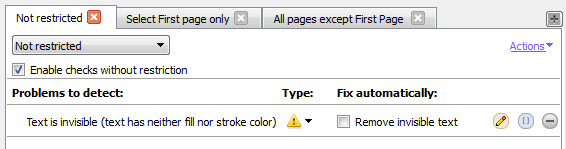
For each group of checks (i.e. each category under Check on), you can decide which restriction applies (if any). If more than one restriction applies for one category, you can use separate tabs (one tab per restriction) as shown below.
Example
Suppose you want to check a PDF for both very small/colored and invisible text. The threshold for text size is different for the cover page and the other parts of the document, whereas invisible text should be detected, regardless of where it is found.
- "Invisible text" should be enabled for all pages in the document, so it should not be restricted. This is the default behavior for which you don't need a restricting Action List.
- "Text size" should be checked twice: once for the cover page and once for the other pages
of the document (each with different values). Therefore, you'll need two extra tabs, each with
a restriction selected:
- Restriction 1 is an Action List that selects the cover page.
- Restriction 2 is an Action List that selects all other pages.
Restrictions in the Preflight Report
If a check is limited by a restriction, in the Preflight Report, the name of the restriction will precede the actual warning. If no restriction is applied, this is not mentioned explicitly.
Best practice
- Think about the restrictions you need.
- Create the Action List(s) to define these restrictions, or check if you can use the pre-defined, ready-to-use restrictions, installed with PitStop.
- Import the required restrictions in the Preflight Profile.
- Configure your checks, choosing the appropriate restriction where needed. If no restriction is chosen, the check applies to the whole document.