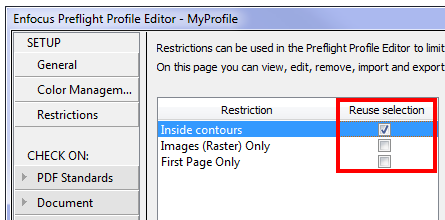
If you want to speed up the time needed to preflight your document, you may enable the Reuse selection checkbox in the Setup > Restriction section of the Preflight Profile Editor.
Meaning
- If Reuse selection is cleared (default behavior), the restricted Action List is executed several times as required, i.e. every time it is used for a check. For example, if five different checks are limited to one and the same restricted selection (e.g. all objects with particular attributes), then the Action List to select these objects is executed five times. In case of complex restrictions, this seriously affects the time needed for preflighing the PDF.
- If Reuse selection is selected, the restricted Action List is executed only once and the resulting selection is remembered and used for the relevant checks in the Profile. In case of complex restrictions, this may save a lot of processing time.
Warning
Only enable this option if the selected area is NOT affected by changes initiated by the Preflight Profile!
Example where it is safe to enable Reuse selection: If your restricting Action List selects all objects inside contours, the selection will remain the same as long as the page layout is not changed throughout the preflighting process. Reusing the selection will reduce the processing time.
Example where it is not a good idea to enable Reuse selection: If your restricting Action List selects CMYK objects and your profile converts CMYK to RGB, it's probably not a good idea to reuse the selection, because once converted, the result of the restricting Action List may not match the changed state of the PDF.