By default, the PDF Review Module is opened in the language of your browser.
To change the language of the PDF Review Module user interface
-
In the top right corner of the screen, click
 .
.
-
In the menu that appears, open the Language list.
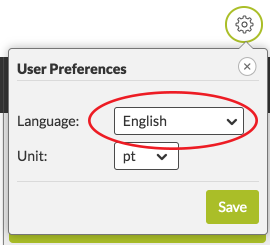
- Select the language of your choice.
- Click Save.
- Reload the page. Next time you open the PDF Review Module (in the same browser and provided that your browser supports cookies), it will automatically be displayed in the language of your choice.