If you want information about dimensions and positions (e.g. the page size, the position of the page boxes), you may want the values to be expressed in a different unit.
To change the default measurement unit in the document/object properties
-
In the top right corner of the screen, click
 .
.
-
In the menu that appears, open the Unit list.
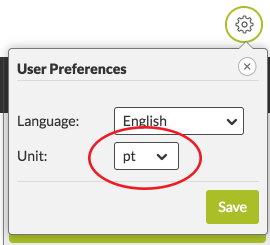
-
Select the unit of your choice.
Choices are:
- pt (points)
- p (picas)
- in (inches)
- cm (centimeters)
- mm (millimeters)
- Click Save.
The unit and values are adjusted immediately.