Although it is not possible to make changes to the PDF, you do have the option to add comments, edit them afterwards and remove them as required. If the document contains a Comments tab, you can as well view comments that are already present in the document.
To add a comment
-
To activate the Add comments tool, click the button
 in the toolbar.
The color of the border of the button changes, to indicate that the tool
is activated and can be used.
in the toolbar.
The color of the border of the button changes, to indicate that the tool
is activated and can be used.  The cursor is adjusted as well - it looks like a
text balloon (same behavior as Adobe Acrobat).
The cursor is adjusted as well - it looks like a
text balloon (same behavior as Adobe Acrobat).
- Click in the PDF, near the object or place where you want to put a comment.
-
In the dialog that pops up, type your name and comment.
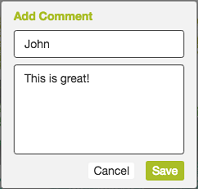
- Click Save. You will see a sticky note where you added your comment. Note that you can drag it to a different place in the document as required.
-
To view and/or edit your comments
-
Click the Comments tab
 in the sidebar.
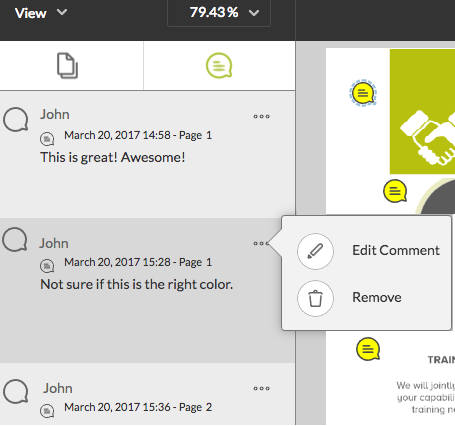
The comments are listed one after the other. The author of the
comment, the creation date and time and the page it applies to are
mentioned. Note that new comments are added to the end of the
list.
in the sidebar.
The comments are listed one after the other. The author of the
comment, the creation date and time and the page it applies to are
mentioned. Note that new comments are added to the end of the
list.
- To edit a particular comment, select it. The selected comment and the corresponding sticky note are highlighted.
-
Click the button
 in the top right corner.
- Click Edit Comment.
- Change the text as required.
- Click Save.
Note:- Alternatively, as long as the Add comments tool is active, you can select the comment by clicking the corresponding sticky note in the document. To change its content, just click it once more.
- You can also edit comments that were already included in the document!
-
Click the Comments tab
-
To remove a comment
-
Select the comment you want to remove:
- Click the comment in the Comments tab
of the sidebar,
OR
- Click the sticky note in the document.
- Click the comment in the Comments tab
-
In the Comments tab, click the button in the top right corner.
- Click Remove.
-
Select the comment you want to remove: