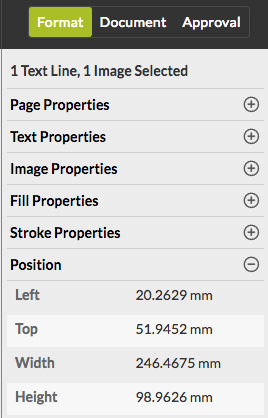
To view the properties of one or more selected objects (image, text, art work), such as the fill and stroke properties, the position, and text or image properties such as image size, resolution,…)
-
Make sure the selection tool is active. By default it is enabled, but if you
have used the pan or add comments tool, you may have to activate it again. To do
so, click the button
 in the toolbar.
The color of the border of the button changes, to indicate that the tool
is activated and can be used.
in the toolbar.
The color of the border of the button changes, to indicate that the tool
is activated and can be used.  The cursor changes into a pointer.
-
Do one of the following:
- To select one object, click it.
- To select multiple objects in one go, hold down the shift key while clicking the objects to include in the selection. Alternatively, you can drag a rectangle around the objects to select them.
- Click the Format tab. At the top of the tab, it's mentioned what is contained in the selection. Depending on the selected objects, different categories are possible, such as Text Properties, Fill Properties, Image Properties, Position, etc.
-
Click the
 button to expand a category as required.