The submit hierarchy and FTP receive tools offer properties to skip certain subfolders of the hierarchy in which incoming jobs are placed. This may be useful in situations where part of the hierarchy is managed by another application or is simply irrelevant for the Switch flow under consideration.
Skip properties
The "Process only these folders" and "Skip these folders" properties cause certain subfolders of the hierarchy (and their contents) to be left untouched. Therefore these properties are called the skip properties in this section.
Refer to Specifying file filters for information on how to specify a value for the skip properties.
There is an important difference between the skip properties and the folder filter properties on outgoing connections: folders that don't match any of the filters on the outgoing connections are removed, while the skip properties cause folders to be left in place.
Basic rules
Each of the skip properties defines a rule for determining which subfolders should be skipped. The key difference between the two properties is their polarity: "Process only these folders" defines which subfolders should not be skipped, while "Skip these folders" defines which ones should be skipped. You can choose either rule depending on what's easiest to express (with a filename pattern, for example) in your situation.
You can also define both rules. If there are any contradictions between the two rules, the "Skip these folders" rule wins (in other words, each of the rules enlarges the set of subfolders that are skipped).
As long as you're dealing with a single level of subfolders, the basic rules should be sufficient for your purposes. A problem arises when there are multiple levels of subfolders because, by default, the basic rules are applied to ALL levels. Often the subfolder names on some of these levels are variable (and not under your control), so that you can't define an appropriate filter to match them.
Limiting the subfolder range
Each of the skip properties offers a subordinate property called "Subfolder range", which is shown as soon as the skip property specifies a filter. The "Subfolder range" property limits the range of subfolder levels on which the test defined by its master property is performed. In other words, the property limits the applicability of the basic rule, so that it no longer applies to levels with subfolder names that are variable and/or irrelevant.
The subfolder range is specified in a format resembling page-range syntax, as described in the following table:
Subfolder range |
The corresponding basic rule applies to |
|---|---|
Empty |
All subfolder levels (this is the default behavior) |
Number |
The specified subfolder level only |
Number1-Number2 |
The subfolder levels starting at Number1 and ending at Number2 (inclusive) |
Number1, Number2 |
The subfolder levels Number1 and Number2 (without the intermediate levels) |
Examples: 3; 1-3; 2-99; 1,3
Example
Consider a folder hierarchy structure as shown in the following diagram.
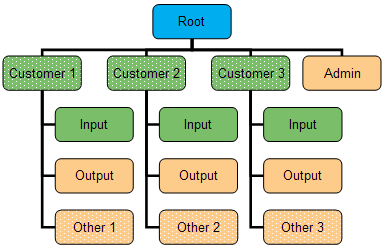
The names of the "Admin", "Input" and "Output" subfolders are fixed, while the names of the "Customer" and "Other" subfolders are variable and not under your control. The intention is to process all jobs that appear inside the "Input" folders and ignore everything else. Here's how you should setup the related properties to accomplish this.
Property |
Set property value to |
|---|---|
Path |
Path to the “Root” folder |
Subfolder levels |
2 |
Process only these folders |
Regular expression “Input” |
Subfolder range |
2 |
Skip these folders |
Regular expression “Admin” |
Subfolder range |
1 |