When you first launch Switch after installing a new version, Switch detects the version change and presents the following dialog:
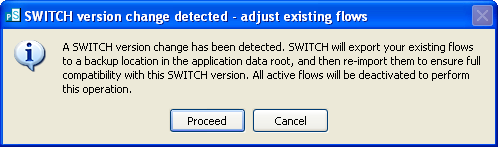
As explained in the dialog message, if you press the "proceed" button Switch makes a backup of your existing flows and then re-imports them. While re-importing the flows, Switch adjusts all flow elements and properties so that they conform with this version of Switch. Any problems are reported to the user. See also importing and exporting flows.
If you press the "cancel" button Switch quits without making any changes to the flows.
Backup location
The automatically exported flows are stored in a folder named for the current date/time inside the Switch designer's application data, which is system dependent.
For example, on a typical Windows system the location might be:
C:\Documents and Settings\All Users\Application Data\Enfocus\PowerSwitch Designer\backup\2007-08-18--16-45-01
And on a typical Mac OS X system the location might be:
/Library/Application Support/Enfocus/PowerSwitch Designer/backup/2007-08-18--16-45-01
Deprecated flow elements
Deprecated flow elements are automatically converted while re-importing existing flows as described above. See upgrading deprecated flow elements.