The submit point and checkpoint tools allow defining metadata fields which can be viewed and/or edited by the SwitchClient user when submitting or moving along a job. The values of display-only fields are determined by evaluating a script expression so that they can depend on metadata associated with the job. After a user submits a job or moves it along, the values of editable fields (as entered by the user) are associated with the job as metadata (with the client fields schema).
Defining editable fields
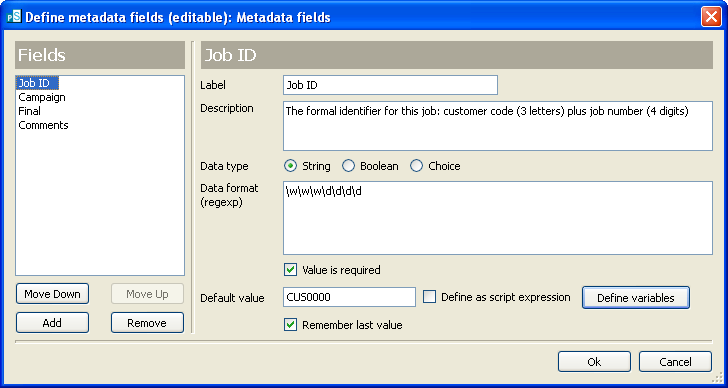
The property editor for editable metadata fields allows creating an ordered list of field definitions (using the buttons under the listbox on the left-hand side). For each field definition, the property editor allows editing the properties described in the table below (using the edit fields and controls on the right-hand side).
Property |
Description |
|---|---|
Label |
The label shown in front of the field |
Description |
A hint displayed when the cursor hovers over the field |
Data type |
The field’s data type: Boolean or string |
Data format |
A regular expression that matches the values allowed for the field (relevant only if data type is string) |
Value is required |
If set to yes, SwitchClient requires that the user enters a non-blank value (relevant only if data type is string) |
Default value |
The default value for the field |
Remember last value |
If set to yes, SwitchClient will use the value most-recently entered by the user as the default |
Defining display-only fields
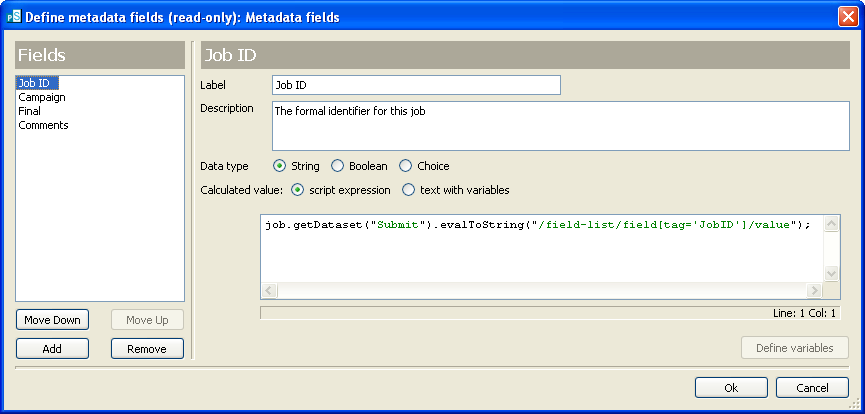
The property editor for display-only metadata fields allows creating an ordered list of field definitions (using the buttons under the listbox on the left-hand side). For each field definition, the property editor allows editing the properties described in the table below (using the edit fields and controls on the right-hand side).
Property |
Description |
|---|---|
Label |
The label shown in front of the field |
Description |
A hint displayed when the cursor hovers over the field |
Data type |
The field’s data type: Boolean or string |
Calculated value |
A script expression that evaluates to the value of the metadata field; it is evaluated in the context of the job being viewed by the user so that it can use metadata associated with the job |