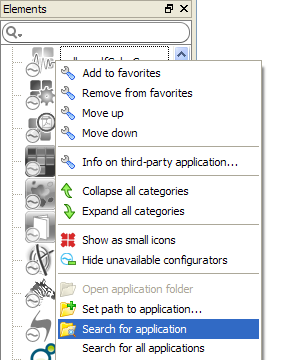
If during startup Switch doesn't detect a third-party application that has been successfully installed, you can trigger a search for the application through the context menu offered by the elements pane (as shown above). You can also use this function if you didn't quit and restart Switch after installing a third-party application.
To search for the third-party application corresponding to a configurator:
- Bring up the context menu for the configurator's icon in the elements pane.
- Choose the Search for application menu item in the context menu.
This function first attempts to detect the third-party application using fast mechanisms, and if that fails, it performs a full file search in the system's program files folder.
Note:
Some configurators do not offer this function, or may not offer the full file search capability.