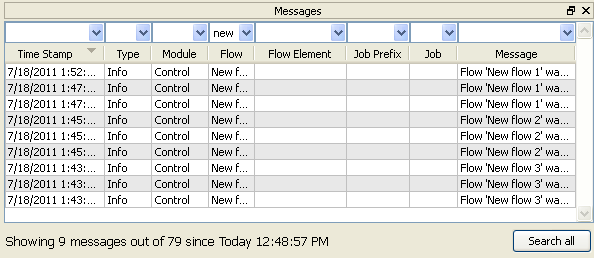
New messages are continuously added to the list while Switch is operating. Warning and error messages are shown in color (yellow for warnings, red for errors).
Filtering and sorting log messages
As the Messages pane may contain a lot of messages, you may want to filter out the ones that are relevant to you. To do so, type the appropriate search strings in the filter fields at the top of the pane. You can sort the displayed messages in different ways by clicking the column headers.
Multiple Messages panes
You can display up to three Messages panes at the same time (called "Messages", "Messages 2" and "Messages 3"). Each pane remembers its own settings for filtering and sorting messages. For example, you could set up three Message panes respectively displaying:
All messages
All messages related to FTP
All error messages
To display the additional Messages panes, on the menu, click or .
Wrap text
To display long messages on multiple lines (i.e. "wrapped" rather than chopped off): Choose the "Wrap text" menu item in the context menu of the Messages pane.