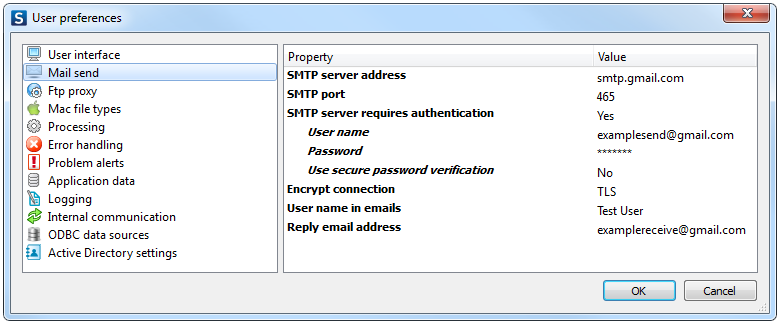
SMTP server address
|
The URL or IP address of the SMTP email relay server.
Example: smtp.gmail.com
|
SMTP port
|
The port used by the SMTP server.
|
SMTP server
requires authentication
|
Defines whether the SMTP server requires authentication.
If set to Yes, following additional fields
appear:
- User name: The login name for the SMTP server.
Example: user@gmail.com
Leave empty if none
is required.
- Password: The password for the SMTP
server.
Leave empty if none is required.
-
Use secure password
verification: Defines whether or not to use
secure password verification.
|
Encrypt connection
|
Defines whether or not the mail server requires an encrypted connection.
Options:
- No encryption: The connection to
the mail server is not secured.
- SSL: Secure connection using the
SSL (Secure Sockets Layer) protocol
- TLS: Secure connection using the
TLS (Transport Layer Security) protocol
|
User
name in emails
|
The sender's name for outgoing email messages.
|
Reply email address
|
The sender's reply address for outgoing email messages.
|