Switch preferences: Web service

These preferences configure the settings related to the communication between the WebServer and the client application.

Property Description
Port

The port used for communication between Switch WebServer and the browser you're using to launch the log messages, in the range of 1 to 65535.

Default value: 51088

Protocol The protocol used for the communication between the Switch WebServer and the browser. Choices:
  • HTTP (default value)
  • HTTPS (secured, encryped communication for which you need a certificate)
If set to HTTPS, the following additional fields appear:
  • Certificate: Path to the certificate file
  • Private key: Path to the private key file
  • Password for private key
Note: If your browser does not recognize the used certificate, it will block the Web Messages View. In that case, you must add it as an exception in your browser settings.
Privacy policy page URL (starting with "http" or "https") of the privacy policy of your company. The privacy policy is added as a link at the bottom of every web page that is sent from the web service to the client, i.e. on all pages displaying messages in a browser.

Example URL: http://www.enfocus.com/en/privacy-policy/

If this property is empty, there is no link displayed.

Note: Changing this property requires a restart of Switch.

A privacy policy contains the guidelines a company uses to protect the information provided by its customers. It's a legal requirement to have such a privacy policy if you're collecting data from your customers. As in Switch the language preference of the users is stored (using cookies) when they launch messages in a web browser, we recommend adding the link to your privacy policy.

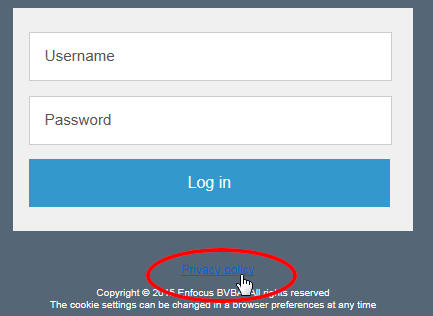
Example of the link to the Privacy Policy, as it is shown on the login page of the Messages overview (web browser overview).