About Text with variables
This type of variable provides access to run-time information about the Switch flow environment and about the job, including embedded metadata fields and external metadata fields, without the need for scripting.
Note that you need an active license for the Switch Databases Module, if you want to use database information, and active license for the Switch Metadata Module, to use metadata fields.
Length/Unit
When you select "Length" as the value type for this variable, an additional dropdown menu called Unit appears, allowing you to choose the appropriate measuring unit.
How to proceed
- To determine the Variable Value, click the ... button.
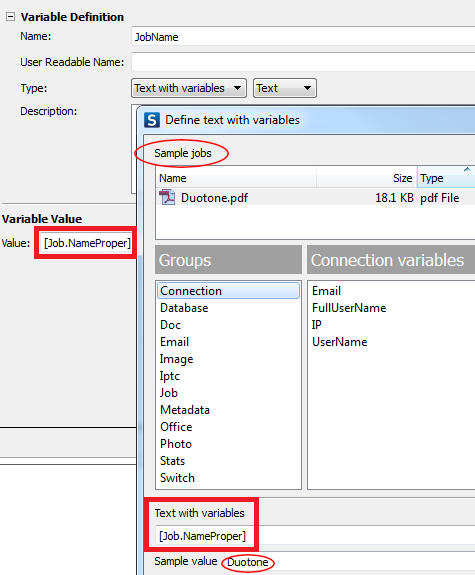
- In the Define text with variables dialog, select the appropriate Variable Group (first column), Variable (2nd column) and attributes (3rd column).
- Click Insert variable.
For more details, refer to Defining text with variables
Example 1
Below you can see the definition of the "JobName" variable (Text). The value returned from the sample Job is "Duotone".
This is a basic example. For more complex cases, refer to the chapter Metadata