If property values are invalid or missing, you are informed in two ways:
- The flow element is displayed with an alert icon (
 ).
). For more information, hover your cursor over the icon to display a tooltip.
- The invalid property is displayed in red in the Properties pane.
Example:
After adding and connecting an FTP receive flow element, the canvas and the Properties pane look as follows:
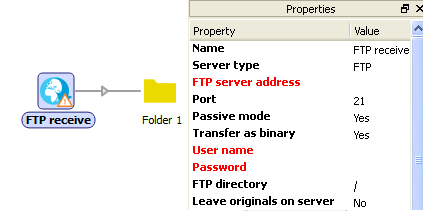
The tooltip for the FTP receive element states: Required fields are not valid: FTP server address, User name, Password.
After entering the missing information, the warning will be gone and the properties will be displayed in black again.