To view Switch jobs through the Switch Web Portal
-
In the Switch Web Portal, in the navigation area, click
 Check jobs.
You can see all jobs you are allowed to see based on your user
permissions (set in the Switch Users pane). The counter (only shown if the menu
is expanded) indicates the number of files waiting in a Checkpoint.
Check jobs.
You can see all jobs you are allowed to see based on your user
permissions (set in the Switch Users pane). The counter (only shown if the menu
is expanded) indicates the number of files waiting in a Checkpoint.
-
To view only a particular set of jobs, apply a filter.
Make sure the navigation area is expanded (by clicking
 or
or
 ).
).
- Click one of the pre-configured filters in the navigation area below Check jobs, for example 'My jobs'. Refer to Job filters.
- Create a filter yourself. Refer to Creating a custom filter.
- The Switch Server is running.
- The information displayed is up-to-date. Refresh your browser window to update the information from the Switch Server.
-
To view the jobs presented in a different way, click the table view or the grid
view button at the bottom of the screen.
View Example Table 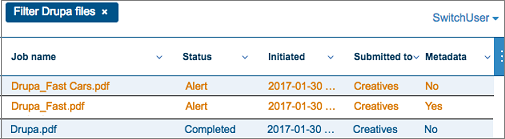 Table-specific options:
- To hide a column, click the icon
 in the top right corner
and clear the checkbox of the column you want to
hide. Note that you can go back to the default
view (and column size/position) via the Refresh
columns option at the bottom of this list.
in the top right corner
and clear the checkbox of the column you want to
hide. Note that you can go back to the default
view (and column size/position) via the Refresh
columns option at the bottom of this list. - To move the columns, drag them sideways.
- To sort the overview, click the header of the column you want to use to sort the overview and click the order of your choice (A-Z or Z-A).
Grid view 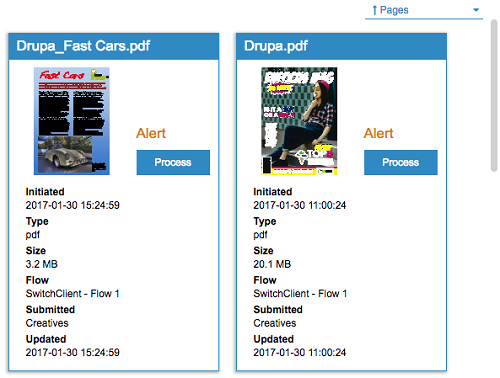
- To hide a column, click the icon
-
To view the details of a job and eventually review and process the job:
- In table view, click the row concerned.
- In grid view, click the Process button of the job you want to check and/or process.