You can manually change connections by clicking and dragging the start or end of a connection from one flow element onto another one.
To manually change connections
- Select the connection you want to change.
- Hover the cursor over the source or target end of the connection
you want to change. A grab handle (red circle) appears, similar to the grab
handle for the corner point, as shown below:
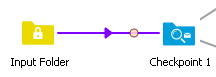
- Click and drag the connection on another flow element,
for which the new configuration is allowed:
For the target of the connection, this is similar to creating a new connection.
For the source, the new source flow element must accept outgoing connection of the same type and with the same injected properties.
Note: To copy the connection instead of moving it, press the Ctrl key (for Windows) or Alt key (for Mac OS).