Sometimes it's useful to temporarily hold jobs, i.e. stop them from moving through the connection, for example because there is a problem with a process downstream.
To put a connection on hold
- Select the connection in the canvas.
-
Do one of the
following
- Right-click the connection and select
Hold.Note: This works, even if the flow is active.
- In the Properties pane, set the value of
the Hold jobs property to Yes.Note: This does not work if the flow is active.
For more information, refer to Examples of connections on hold.
- Right-click the connection and select
Hold.
Once put on hold, the connection is displayed in the canvas as an orange dashed
line.
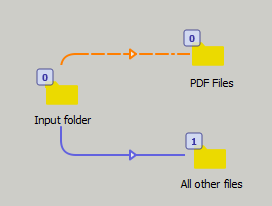
Note: If a job is
being processed over the connection when the transition occurs,
that job/process will be allowed to complete normally. In that case
a job will arrive in the connection's destination after the connection
has been put on hold.